
StoryPress is a news and magazine theme built for editors who want real layout flexibility without touching a page builder. Built on the trusted Underscores (_s) starter, it ships with eight distinct homepage layouts, category-based story sections, full branding control, and block-editor support — all configurable from the WordPress Customizer and without requiring custom post types, shortcodes, or plugin dependencies.
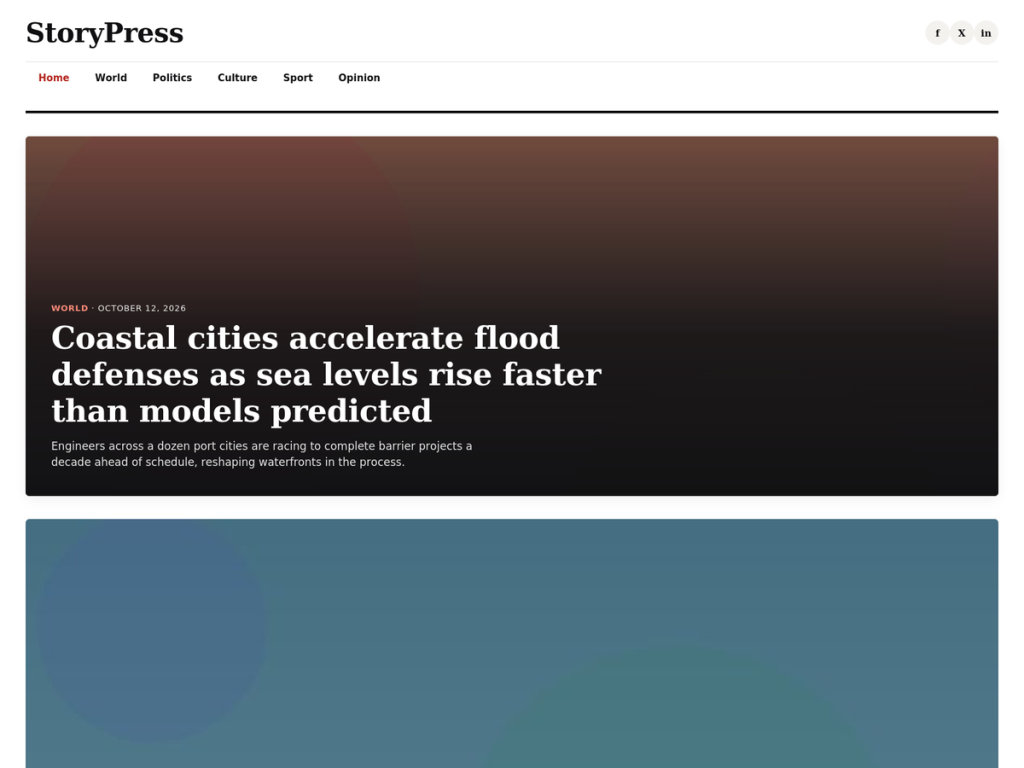
Here’s everything StoryPress does, in plain terms.
Eight homepage layouts, one click apart
Every newsroom presents stories a little differently. Instead of locking you into one homepage design, StoryPress gives you eight layouts, all switchable from Appearance → Customize → Homepage Layout:
Grid — equal-weight story cards, ideal for a general news front page.
List — compact rows with a thumbnail and summary, good for a busy, high-frequency feed.
Magazine — one large lead story followed by a grid of secondary stories, suited to a features-driven front page.
Hero Grid — a full-bleed hero photo with an overlaid headline, followed by a four-column grid of secondary stories.
Traditional Wire — a dense, text-forward headline feed with no thumbnails, styled after classic wire-service listings.
Top Stories — an asymmetric mixed-size grid with one large lead story, two medium stories, and a row of smaller stories.
Latest News (Horizontal) — a horizontally scrolling strip of headline cards, useful for a “latest” news section.
Latest News (Vertical) — a dense, timestamped single-column feed, suitable for a live-blog-style front page.
Switching layouts is instant — no rebuilding pages, no shortcodes, and no page-builder templates to maintain.
Category-based homepage sections
Beyond the main layout, you can add up to three additional story rows to the homepage, each pulling posts from a category you choose — a “World” section, a “Sport” section, a “Culture” section, or however your newsroom is organized.
Each section lets you set:
Which category it pulls from
An optional custom title, defaulting to the category name
How many stories to display, from 2 to 8
You can turn the feature on or off entirely, and leave any section unused if you don’t need it.
Full branding control, no code required
Everything a newsroom needs to make StoryPress its own is available through the WordPress Customizer:
Custom logo — upload and manage your site logo from Appearance → Customize → Site Identity.
Optional masthead header image — display an additional header image above the site title.
Custom background — choose a background color or image.
Accent color — control the theme-wide color used for links, category labels, pagination, buttons, and other interface elements.
Sidebar position — choose between left, right, or no sidebar.
Custom footer text — add your own footer message or use the sensible default.
Social media links — add Facebook, X/Twitter, Instagram, YouTube, and LinkedIn profiles. Only platforms with a URL configured are displayed.
The goal is simple: give editors control over the site’s visual identity without requiring them to edit theme files.
Ready for the block editor
StoryPress isn’t a full block theme, but it works naturally with the modern WordPress block editor:
Editor styles — writing and editing more closely reflects the appearance of published content.
Wide and full-width block alignment — use broader content layouts where supported.
Four custom block styles — including Pull Quote for the Quote block, Dotted for the Separator block, Outline for the Button block, and Caption Card for the Image block.
Two starter block patterns — a Story Byline pattern and a Pull Quote Section pattern, both available under the StoryPress pattern category.
These features let writers and editors create richer article layouts without introducing a page-builder dependency.
Thoughtful keyboard and interaction support
StoryPress includes several accessibility-minded interaction features designed to make the theme easier to navigate:
A skip-to-content link that becomes visible when it receives keyboard focus.
Keyboard-operable dropdown navigation designed around the WAI-ARIA Disclosure pattern.
Dropdown menus that can be operated using keyboard navigation, including Escape to close menus.
Visible focus states for interactive elements such as links, buttons, and form fields.
Support for prefers-reduced-motion, allowing animations and transitions to respect a visitor’s motion preference.
Deliberate styling for different content states and layout variations.
StoryPress does not currently claim the WordPress accessibility-ready theme tag. A separate accessibility review is not being requested at this time, although a dedicated accessibility review may be pursued in a future update.
Built the WordPress way
StoryPress sticks to core WordPress APIs and standard theme functionality throughout, including menus, widgets, the Customizer, and WordPress theme-support features.
It does not register custom post types, shortcodes, or user roles, helping it remain compatible with the content and functionality provided by plugins.
The theme is translation-ready, uses a consistent text domain, and is licensed under GPLv2 or later, the same license family used by WordPress.
Keep SEO and structured data in dedicated plugins
StoryPress focuses on presentation and publishing rather than trying to replace a dedicated SEO solution.
The theme does not generate its own Open Graph tags, Twitter Cards, Schema.org/JSON-LD structured data, or other SEO metadata.
This keeps those responsibilities separate from the theme and allows site owners to choose the SEO or structured-data plugin that best fits their needs. It also helps avoid conflicts when a site already uses an SEO plugin that manages these features.
Your content and theme presentation remain independent of whichever SEO solution you choose.
Getting started
Install and activate StoryPress from Appearance → Themes.
Go to Appearance → Customize to choose a homepage layout, configure your accent color, upload your logo, and add your social profiles.
Optionally enable Homepage Category Sections to feature specific topics below your main homepage layout.
Customize the remaining theme settings to match your publication’s branding.
Publish.
Your homepage layout can be changed at any time without rebuilding pages or editing theme code.